28 April 2026
The Boolean Search Guide for Recruiters (2026)
A complete, honest guide for recruiters: the operators, 15 copy-paste strings, the platform quirks, what changed in 2026, and what Boolean quietly can't do.
A complete, honest guide for recruiters: the operators, 15 copy-paste strings, the platform quirks, what changed in 2026, and what Boolean quietly can’t do.
Start Here: The Uncomfortable Truth
Most Boolean guides open by promising to make you a sourcing wizard. This one starts somewhere less flattering.
Boolean search is not a strategy. It’s a workaround.
Recruiters build long, intricate search strings for one reason: they don’t trust the platform to surface the right people on its own. And they’re right not to. So the strings get longer, more nested, more fragile, not because hiring is complex, but because the search systems underneath are.
Here’s the thing, though. A workaround you’ve mastered still beats one you haven’t. Boolean is the most reliable lever recruiters currently have over a system that won’t otherwise cooperate. You should know it cold. Three operators (AND, OR, NOT) can turn 500,000 irrelevant profiles into 50 worth your time, and that’s real, usable value today.
So this guide does two things, in order. First, it teaches you Boolean properly: the operators, 15 copy-paste strings, the platform-by-platform quirks, the mistakes that quietly wreck your results. No fluff. Then, once you’ve got the craft, it’s honest with you about what Boolean structurally cannot do, because the best recruiters we’ve spoken to already feel those limits, even if they’ve never named them.
Master the workaround. Then understand why it’s a workaround. Both matter.
What Boolean Search Actually Is
Boolean search uses logical operators to combine or exclude keywords. It’s the difference between telling a search engine exactly what you want and hoping it guesses.
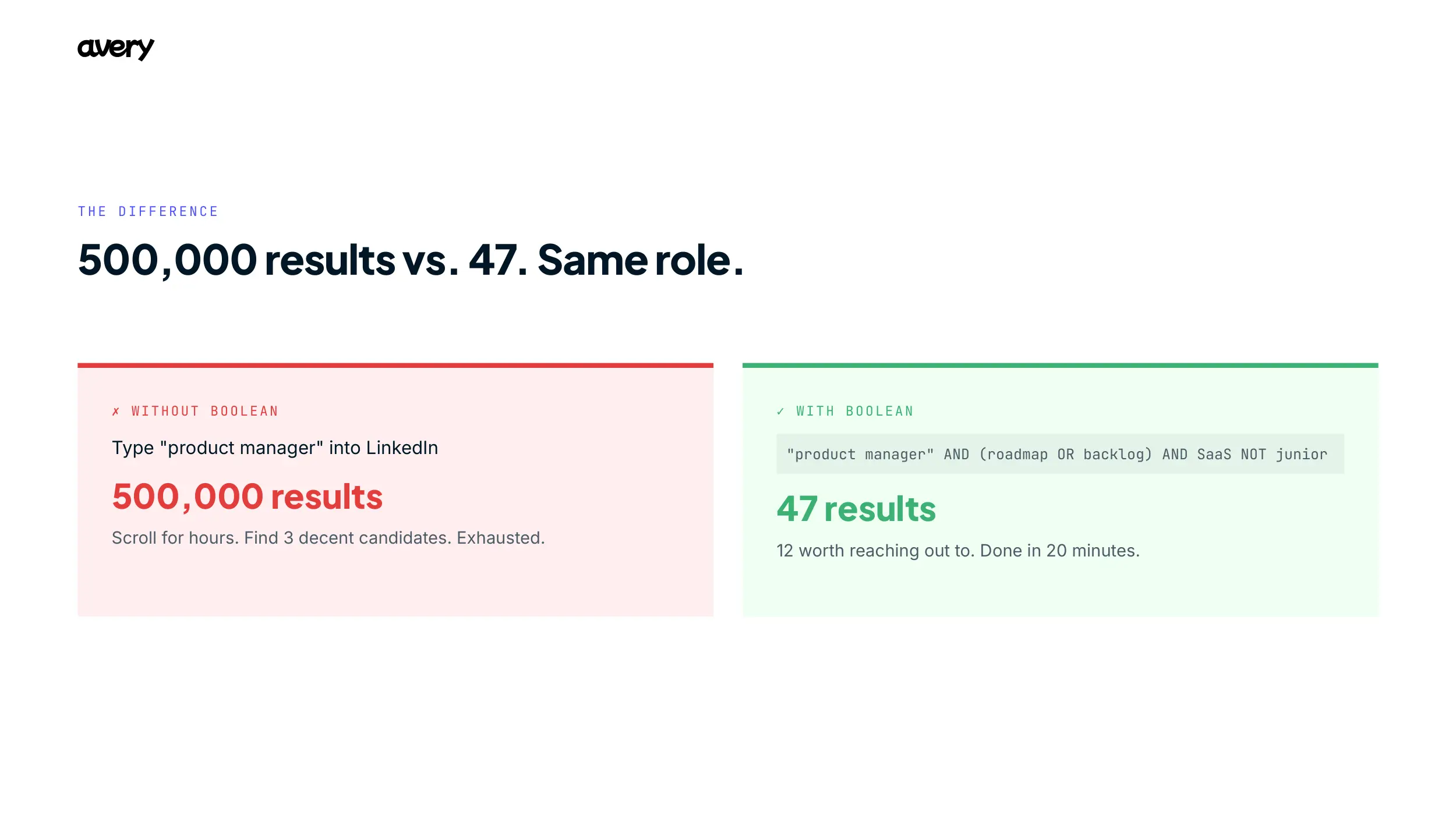
Without Boolean: You type “product manager” into LinkedIn, get back something north of 500,000 results, most of them junior PMs, non-tech PMs, or people who mentioned “product” once. You scroll for an hour, find three decent candidates, and you’re drained.
With Boolean: You type “product manager” AND (roadmap OR backlog) AND SaaS NOT junior, get back roughly 50 results, a dozen of them worth a message, and you’re done in twenty minutes.
That’s the difference. It works on:
- Recruiting platforms: LinkedIn (free, Lite, or Recruiter), GitHub, Wellfound (formerly AngelList)
- Job boards: Indeed, ZipRecruiter, Glassdoor
- Search engines: Google and Bing (X-Ray sourcing, covered later, including what broke)
- Your own systems: your ATS, internal candidate databases
It gives you control: candidates with multiple required skills, several job titles at once, the ability to exclude the overqualified, and a search you can read, debug, and re-run. That last part, a query you can actually inspect, matters more than it sounds, and we’ll come back to it in the GDPR section.
Bottom line: Boolean is the difference between hoping you find the right candidate and knowing you’ve at least searched properly.
The Three Operators (Master These First)
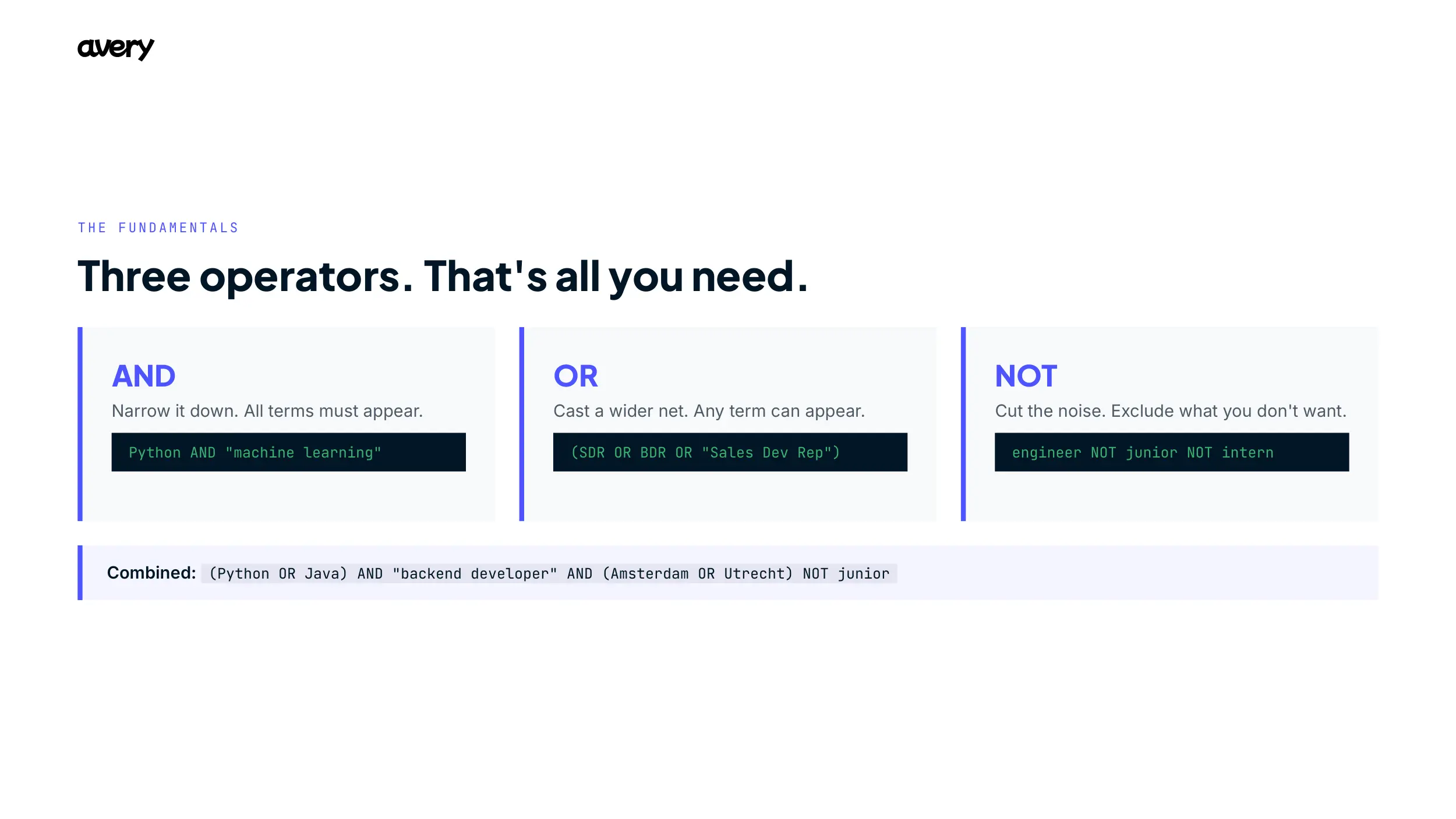
AND: Narrow it down
Returns results containing all specified terms.
Python AND “machine learning” AND Amsterdam
More AND means fewer, more specific results. Start broad, add terms until you hit the sweet spot.
OR: Cast a wider net
Returns results with any of the specified terms.
(SDR OR “Sales Development Representative” OR BDR)
Always wrap OR groups in parentheses when combining with other operators. Search engines parse ambiguity badly otherwise.
NOT: Cut the noise
Removes results containing specified terms.
“software engineer” NOT senior NOT lead NOT manager
Don’t overdo it. NOT (junior OR intern) is fine. Chaining seven NOTs excludes good people who mentioned a word once in a side project. This is a bigger problem than it looks, and the interview findings near the end explain why.
Putting it together
(Python OR Java) AND “backend developer” AND (Amsterdam OR Utrecht) NOT junior NOT intern
Backend devs who know Python or Java, in Amsterdam or Utrecht, excluding juniors and interns. That’s your foundation.
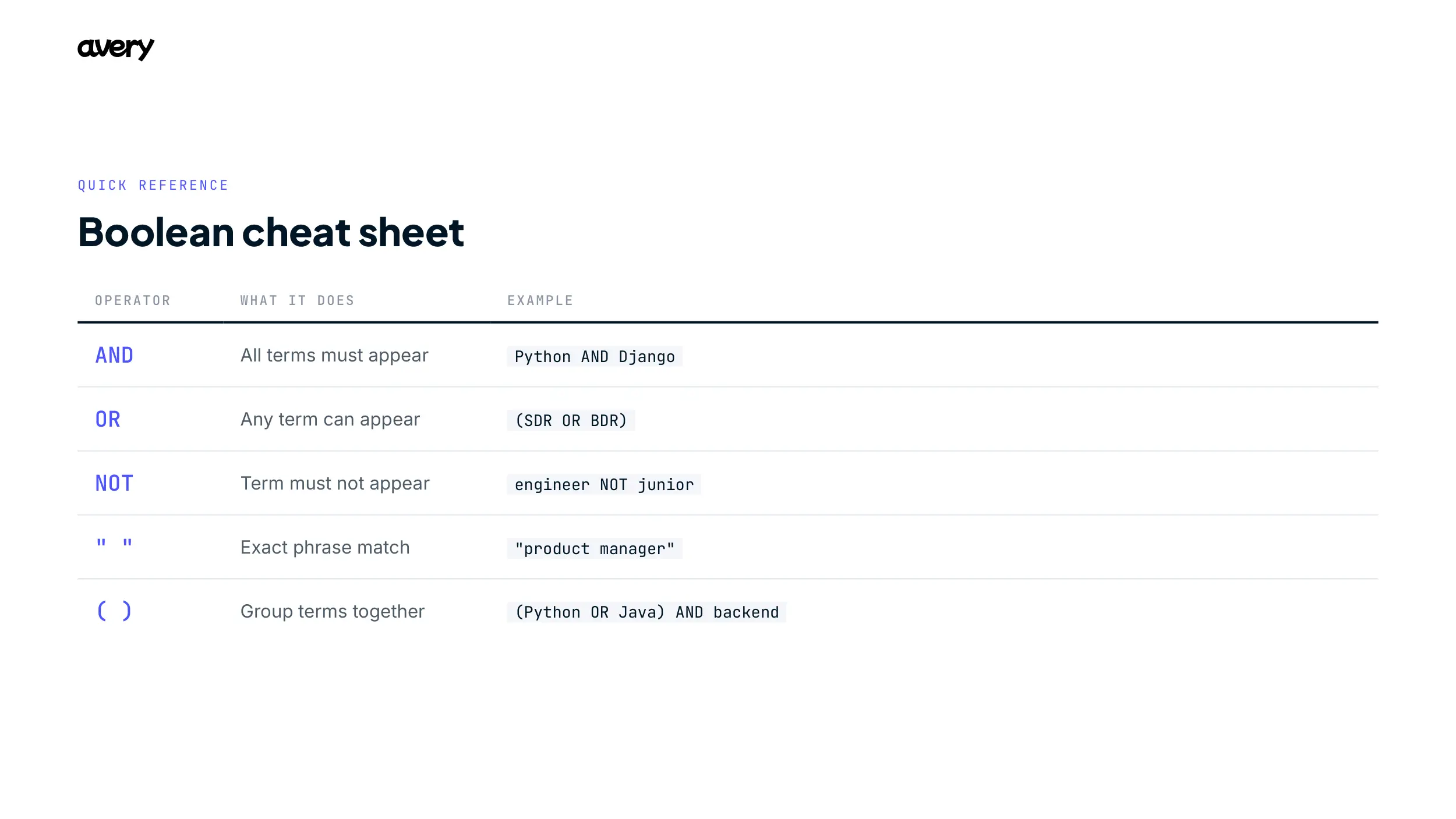
Cheat Sheet (screenshot this)
15 Ready-to-Use Boolean Strings {#15-strings}
No theory. Copy one, adjust for your location and level, run it.
1. Software Engineer (Backend, Python)
(Python OR Django OR Flask) AND (“backend developer” OR “backend engineer”) AND (API OR REST OR GraphQL) NOT junior NOT intern
2. Frontend Developer (React)
(React OR ReactJS OR “React.js”) AND (JavaScript OR TypeScript) AND (“frontend developer” OR “frontend engineer”) NOT junior
3. Sales Development Representative (SaaS)
(SDR OR “Sales Development Representative” OR BDR) AND (SaaS OR B2B) AND (outbound OR prospecting OR “lead generation”)
4. Product Manager (Tech/SaaS)
“product manager” AND (roadmap OR backlog OR OKR) AND (agile OR scrum) AND (SaaS OR B2B) NOT intern NOT associate
5. Data Scientist (AI/ML)
(“data scientist” OR “ML engineer”) AND (Python OR R) AND (“machine learning” OR “deep learning” OR NLP) AND (TensorFlow OR PyTorch OR scikit-learn)
6. DevOps Engineer
(“DevOps engineer” OR SRE) AND (AWS OR Azure OR GCP) AND (Docker OR Kubernetes) AND (CI/CD OR Jenkins OR GitLab) NOT junior
7. Customer Success Manager (SaaS)
(“customer success manager” OR CSM) AND (SaaS OR B2B) AND (retention OR churn OR onboarding)
8. UX/UI Designer
(UX OR “user experience” OR UI OR “user interface”) AND (designer OR design) AND (Figma OR Sketch OR “Adobe XD”) AND (prototype OR wireframe OR “user research”) NOT junior
9. Marketing Manager (B2B SaaS)
“marketing manager” AND (B2B OR SaaS) AND (“demand generation” OR “growth marketing”) AND (HubSpot OR Salesforce OR “marketing automation”)
10. HR Manager / People Ops
(“HR manager” OR “People Operations” OR “People & Culture” OR HRBP) AND (recruitment OR onboarding OR “employee engagement”) AND (scale-up OR startup OR tech)
11. Account Executive (Enterprise SaaS)
(“account executive” OR AE OR “enterprise sales”) AND (SaaS OR B2B) AND (enterprise OR “mid-market”) AND (Salesforce OR CRM OR pipeline)
12. Content Writer / Content Marketer
(“content writer” OR “content marketer” OR “content strategist”) AND (SaaS OR tech OR B2B) AND (SEO OR “blog writing” OR copywriting)
13. Finance Manager / FP&A
(“finance manager” OR “financial analyst” OR FP&A) AND (SaaS OR tech OR startup) AND (forecasting OR budgeting OR “financial modeling”)
14. Technical Recruiter
(“technical recruiter” OR “talent acquisition”) AND (software OR engineering) AND (sourcing OR Boolean OR “LinkedIn Recruiter”) NOT coordinator
15. Operations Manager / COO
(“operations manager” OR COO) AND (scale-up OR startup OR tech) AND (process OR efficiency OR “cross-functional”)
How to customize these
Location. Add AND Amsterdam , or better, use the platform’s location filter to save space. Note for European markets: titles vary by language. A DACH search may need (Softwareentwickler OR Softwareingenieur OR “Software Engineer”); a French one (Développeur OR “Ingénieur logiciel”). English-only strings quietly miss half a local market.
Experience level. For entry-level, remove NOT junior and add AND (graduate OR “entry-level” OR “0-2 years”). For senior, add AND (senior OR lead OR “5+ years”).
Remote roles. Add AND (remote OR “work from home” OR distributed).
Copy one. Run it. Adjust. That’s your first batch of candidates in under five minutes.
Platform-Specific Syntax (Including What Broke in 2024)
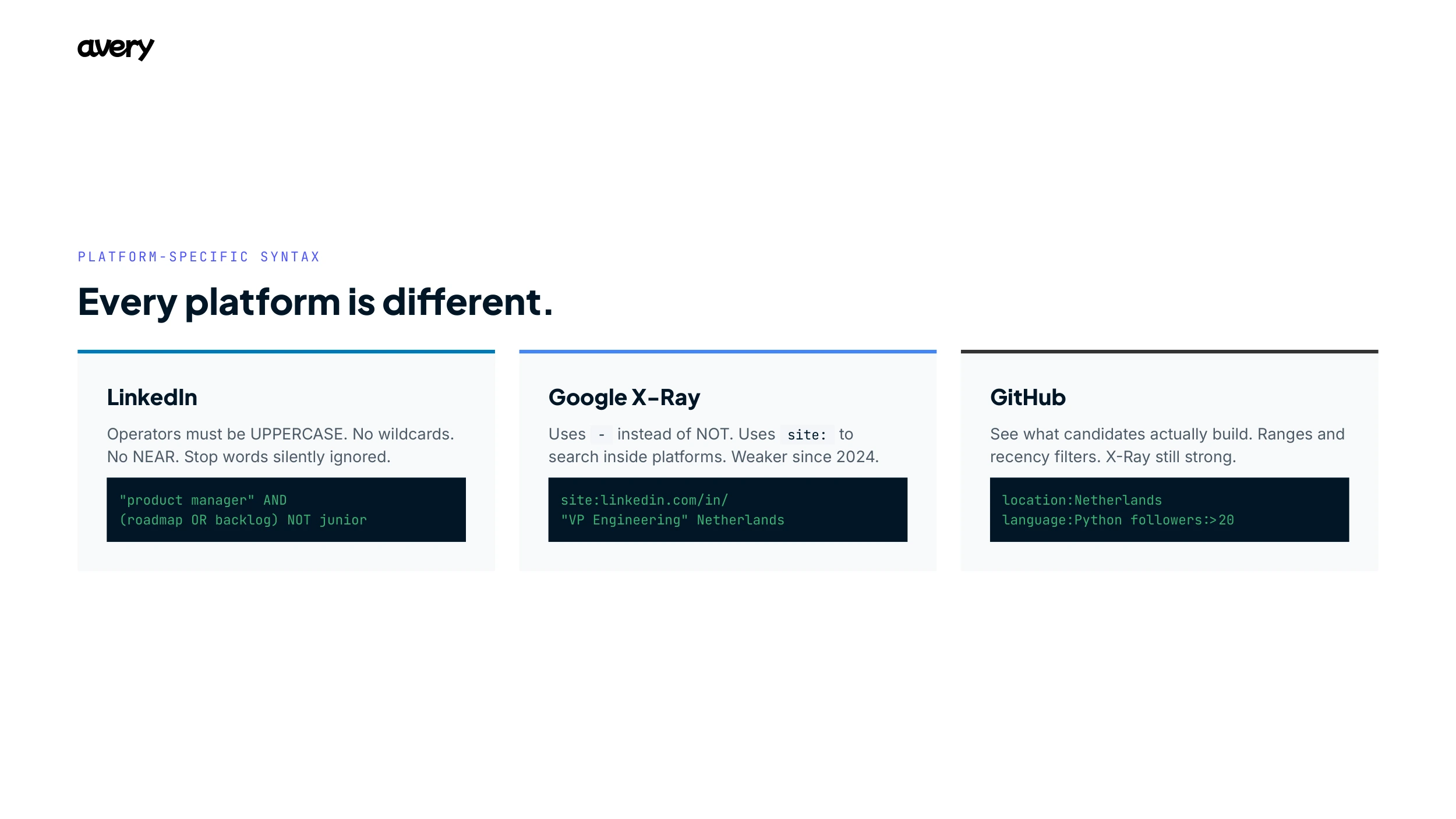
- Operators must be written in uppercase: AND, OR, NOT. Lowercase breaks them.
- Supports exact phrases (“product manager”) and parentheses.
- Does not support wildcards () or proximity operators (NEAR).
- Stop words are ignored, including and, or, the, of, at, by, to, for, with, in, from, not, but, after. Searching “after sales” returns profiles containing only “sales.” A common cause of baffling results.
- On operator limits: LinkedIn’s own help documentation states that the free consumer search engine limits the number of Boolean operators in a query, to keep search fast and deter scraping. But it does not publish a character limit, and the widely circulated “around 500 / 1,000 / 2,000 character” figures are not from LinkedIn. LinkedIn’s docs are explicit that Recruiter and Recruiter Lite have no limit on the number of Boolean operators. Practical takeaway: on free LinkedIn, expect to hit a ceiling after a few large OR groups; on Recruiter, the real limit is your own ability to read the string.
- The structured filter dropdowns (Must have, Can have, Doesn’t have) map directly to AND, OR, NOT. Use them; they’re easier to debug.
Google and Bing X-Ray Search: read this before you rely on it
X-Ray search means using a search engine to look inside a platform: site:linkedin.com/in/ [keywords]. For years this was a recruiter superpower. In January 2024 LinkedIn changed how its profiles are indexed, and a large amount of profile data (skills, much of the experience section, parts of the About section) is no longer visible to Google. A search like site:linkedin.com/in/ “software engineer” “Python” Amsterdam now returns a fraction of what it once did, because the keywords you’re matching on are often no longer in the indexed text.
What this means in practice:
- X-Ray on LinkedIn still works for name and current job title, since these sit in the page header and remain indexed. It is far weaker for skill-based and experience-based searches.
- Try the same query on Bing as well as Google, since coverage differs.
- For technical roles, GitHub X-Ray is now the stronger play (see below).
- Don’t teach or trust LinkedIn X-Ray as a primary sourcing channel in 2026. It’s a supplement now, not a backbone.
Basic formula, still useful within those limits:
site:linkedin.com/in/ “VP Engineering” (SaaS OR fintech) Netherlands
Google uses - instead of NOT:
site:linkedin.com/in/ “engineering manager” Amsterdam -recruiter
GitHub
For technical roles, GitHub shows you what candidates actually build. GitHub’s native search:
location:Netherlands language:Python followers:>20 repos:>15
Ranges and recency work too: followers:100..500, pushed:>2025-01-01. And GitHub X-Ray via Google remains genuinely effective:
site:github.com “Amsterdam” “machine learning” Python
Find a strong GitHub profile, then cross-reference to LinkedIn for the full picture.
LinkedIn Free vs. Lite vs. Recruiter: What You Actually Get
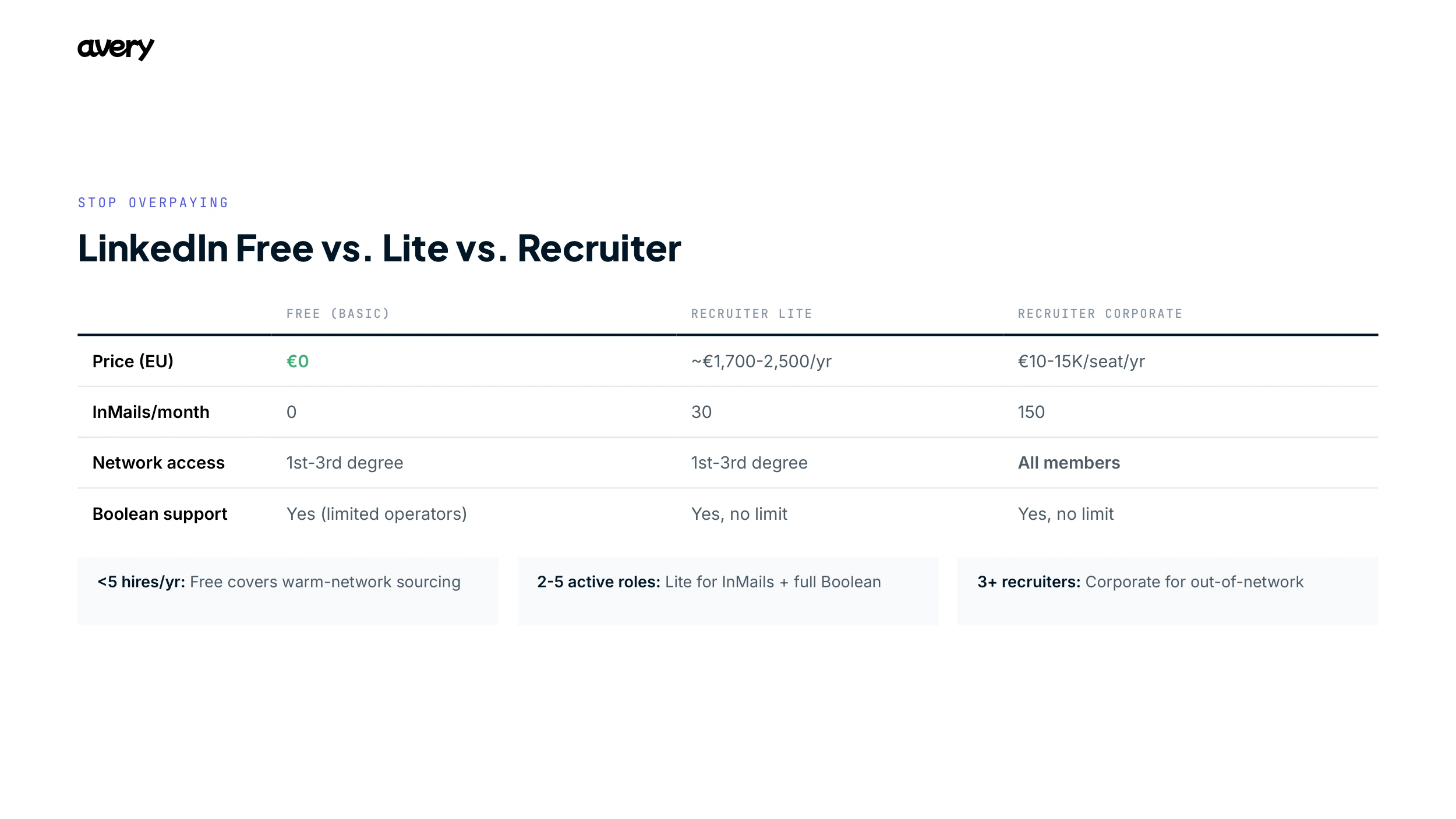
Recruiters routinely overpay for LinkedIn or assume the free tier is useless. Both are wrong. Here’s the honest breakdown for European buyers.
A few things worth knowing that don’t fit in a table. The free tier’s commercial-use limit is real but unpublished. LinkedIn won’t tell you the exact number; recruiters typically hit a warning after a few hundred profile-heavy searches in a month, then get blocked until the 1st. Pricing for Recruiter Corporate is quote-only in Europe, varies by country and team size, usually carries a three-seat minimum, and tends to rise 10 to 15 percent at renewal unless you cap it in writing. And note the naming: LinkedIn has been rebranding “Recruiter Lite” to simply “LinkedIn Recruiter” on some pages, with the old Recruiter becoming “Recruiter Corporate.” Most recruiters still use the older names.
When to be on each tier:
- Free: fewer than about 5 hires a year, mostly in-network and generalist. Boolean on free LinkedIn genuinely covers a lot of warm-network sourcing.
- Recruiter Lite: you’re sending more than about 10 InMails a week, or actively working two to five roles.
- Recruiter Corporate: three or more recruiters needing shared pipelines, ATS integration, or out-of-network access for niche or international hiring.
And the honest version of a claim you’ll see in older guides: free LinkedIn does not get you “70% of Recruiter.” For warm, in-network, generalist roles it replicates a meaningful share of the value. For out-of-network, niche, or international searches, Recruiter Corporate’s full member access and intent filters reach people free search simply cannot.
Advanced Techniques
Nested queries
Layer conditions for precision:
((Python OR Java) AND (“backend developer” OR “software engineer”)) AND ((Amsterdam OR Rotterdam) NOT Eindhoven) NOT (junior OR intern)
It looks like code. You don’t need a CS degree, just match the parentheses.
Title targeting
Search only profile headlines:
site:linkedin.com/in/ intitle:“VP Engineering” (SaaS OR fintech) Netherlands
Headlines are still indexed after 2024, so intitle: X-Ray held up better than keyword X-Ray.
Passive candidate sourcing
The best candidates aren’t job hunting. Target signals of expertise instead:
site:linkedin.com/in/ (“speaker” OR “panelist” OR “author”) AND “data science” AND Netherlands
People good enough to speak at conferences are good enough to approach. But hold onto that word, signals. It comes back later, because this is exactly where Boolean starts to strain.
7 Common Mistakes
1. Not capitalizing operators on LinkedIn. LinkedIn needs Python AND Django in uppercase. Mix cases and you get garbage.
2. Missing parentheses with OR. Python OR Java AND backend reads as Python OR (Java AND backend). Fix it with (Python OR Java) AND backend.
3. Too many NOTs. Eight chained NOTs exclude qualified people who used a word in passing. Fix it with NOT (senior OR lead OR manager).
4. Not using exact phrases. product manager finds “product” and “manager” separately. Fix it with “product manager”.
5. Ignoring synonyms. “front-end developer” misses “frontend developer”, “UI developer”, and “UI engineer”. Cover the variants, and the languages, in Europe.
6. Over-complex strings. A 500-character monster is impressive and unusable. If you can’t read it, you can’t debug it. Break it into two or three focused searches.
7. Not iterating. Your first string is never right. Check the first ten results, adjust, re-run. Treat Boolean as a conversation, not a one-shot formula.
GDPR: Sourcing Without Getting Fined
If you source candidates in Europe, Boolean isn’t just a productivity question. It’s a compliance one. The short version:
- You need a legal basis. Initial sourcing usually relies on legitimate interest (GDPR Art. 6(1)(f)). Once you make contact, you move toward consent or contract.
- You must tell people. Article 14 requires you to inform a sourced candidate how their data is being processed, generally within one month of first contact.
- You can’t keep data forever. Regulator guidance points to retaining unsuccessful-candidate data for no longer than 6 to 12 months without explicit consent.
- The fines are real. Up to €20M or 4% of global turnover. LinkedIn itself was fined €310M by the Irish regulator in 2024 over unlawful data processing, and the Dutch DPA fined Uber €290M the same year over data transfers. Employment-sector enforcement is active, not theoretical.
This is, quietly, one of Boolean’s underrated strengths. A Boolean string is transparent and deterministic. You can show exactly what you searched for and why. That auditability matters when a regulator, or a candidate exercising data-subject rights, asks. Keep your strings readable for that reason too.
One more thing on the horizon: the EU AI Act classifies AI systems used in recruitment as “high-risk,” and those obligations apply from 2 December 2027, moved back from 2 August 2026 by Regulation (EU) 2026/1744, the Digital Omnibus on AI, which entered into force on 27 July 2026. A separate set of prohibitions, on things like emotion recognition in the workplace, has been in force since February 2025. If you adopt AI sourcing tools, this is a conversation to have with your DPO now, not later.
AI and Boolean: What Changed
Three honest shifts a 2026 recruiter should know:
LLMs now write your strings. ChatGPT, Claude, and Gemini will turn a job spec into a working Boolean string in seconds. Give them the role, must-have skills, location, exclusions, and target platform, and you’ll get a usable query. A good starting point, not a final answer.
Natural-language sourcing tools increasingly replace Boolean. A growing category of tools lets you describe the candidate in plain language and searches hundreds of millions of profiles for you. Boolean still matters for precision and for the audit trail, but the pure-Boolean workflow is no longer the only serious option.
LinkedIn itself is moving. LinkedIn’s Hiring Assistant, an AI agent for recruiters, has been rolling out since late 2024 and is now broadly available in English. LinkedIn reports early adopters reviewing 62% fewer profiles per role. Read that number carefully: the platform that made Boolean necessary is itself trying to move past it.
What 1,000 Recruiter Interviews Told Us
We built Avery from more than 1,000 in-depth interviews with proactive hiring teams across Europe, plus a design-partner network of 100+ recruiters working alongside the product team every month. Here’s the part nobody enjoys saying out loud.
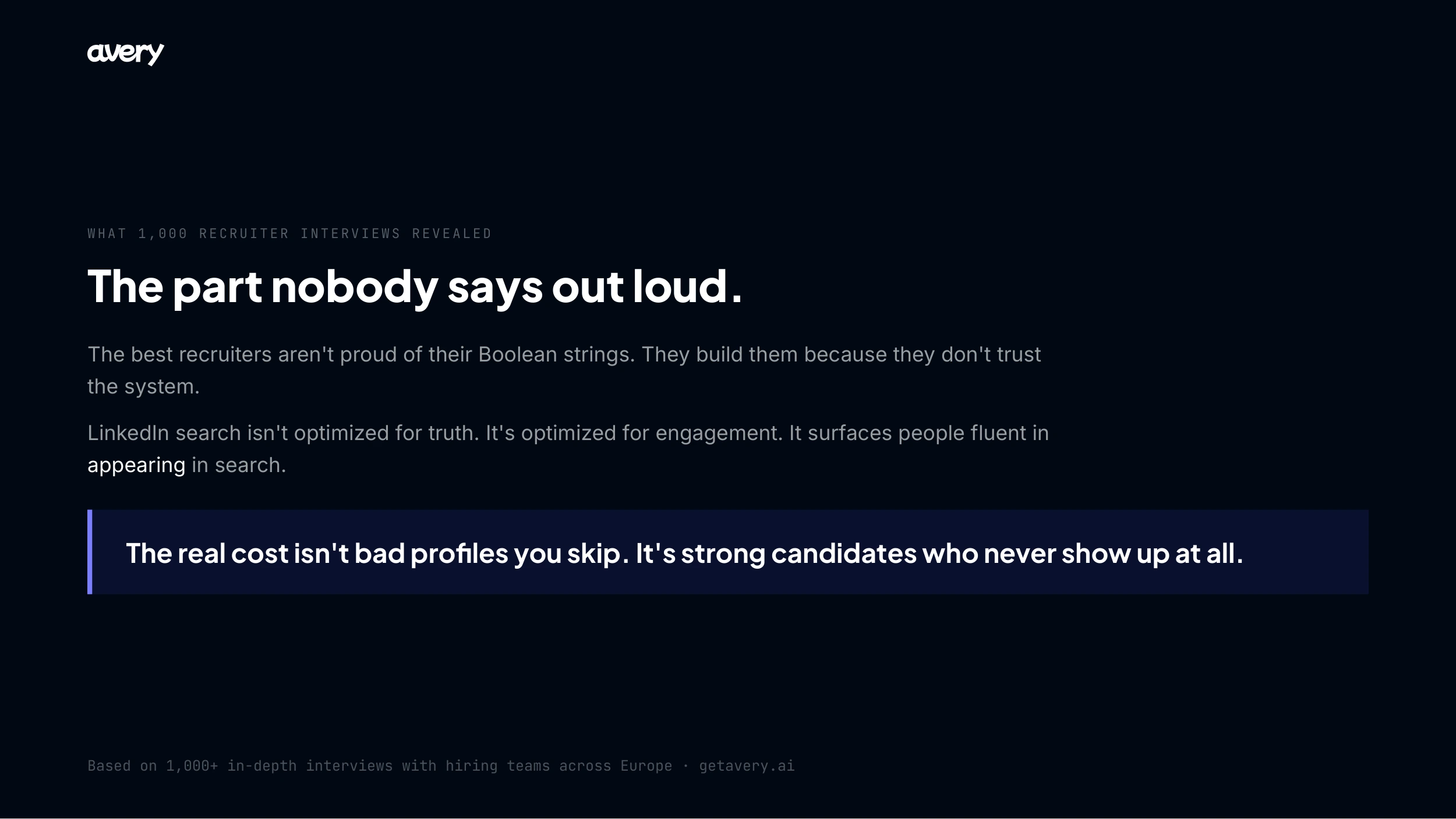
The best recruiters aren’t proud of their Boolean strings. They build them because they don’t trust the system to surface the right people otherwise. The strings grow longer and more fragile over time, not because the hiring problem is complex, but because the system underneath is.
A lot of “advanced sourcing” is performative. We repeatedly saw recruiters reusing and tweaking strings they didn’t fully understand. In several cases, removing entire synonym clusters changed the results in no meaningful way. The complexity signals expertise without necessarily improving outcomes.
LinkedIn search isn’t optimized for truth. It’s optimized for engagement. It over-indexes on candidates who are active, keyword-optimized, and fluent in how to appear in search. Boolean doesn’t fix that bias. It just filters within it.
So recruiters end up searching for proxies instead of signals. Brand names, titles, company stages, not because anyone believes these perfectly indicate quality, but because the things they actually care about (ownership, comfort with ambiguity, growth slope) aren’t searchable.
And here’s the real cost. It isn’t false positives. A bad profile in your results is annoying but harmless; you skip it. It’s false negatives. Strong candidates with unconventional backgrounds, unclear titles, or simply less polished profiles never show up at all. And almost nobody measures this, because you can’t see who’s missing.
The downstream effect is pipelines that feel qualified but are quietly homogenized. Not because recruiters lack creativity, but because the system rewards people who are easy to find.
When Boolean Isn’t Enough
Boolean is a genuine skill, and you should keep it. Let’s also be precise about its ceiling:
- Building a good string takes 10 to 20 minutes per role.
- It’s keyword-based. It misses people who describe the same skill differently, and it can’t see the candidates who never optimized their profile.
- It can’t assess trajectory, ownership, or fit.
- For one tightly defined role, Boolean is excellent. Across five simultaneous roles, it becomes the bottleneck.
Avery comes from a different premise. Instead of giving recruiters more control over the query, it tries to give them better control over the outcome, stepping away from rigid keyword matching toward a system that learns what “good” looks like over time, based on actual hiring decisions rather than just search inputs.
And here’s where we’ll be straight with you. Avery isn’t always the right tool.
If you know exactly what you’re looking for, a tightly defined profile with non-negotiable requirements, a specific certification, a hard clearance, then Boolean is still more precise. It’s transparent, deterministic, and very good at enforcing hard constraints. Avery is weaker in those edge cases. For a reason.
Avery also isn’t instant. Without context, meaning your company/client in-depth description, feedback, your preferences, it starts closer to a very good search than a magical one. And for recruiters used to controlling every input by hand, it can feel like giving up visibility into why someone matched.
That’s the genuine trade-off:
Boolean optimizes for control over inputs. Avery optimizes for learning from outcomes.
The reason that trade-off matters is simple. Most hiring problems aren’t about expressing a perfect query. They’re about discovering people you wouldn’t have thought to search for, and recognizing them when you see them.
What Avery adds on top of Boolean:
- 7-dimension matching beyond keywords. It understands a candidate in context, so a “data pipeline architect” matches “data engineer” without the exact term.
- Market intelligence. Salary ranges, talent pool size, and hiring difficulty before you start.
- 125M+ vetted and enriched candidates across Europe, plus your own ATS.
- Learning from outcomes. It gets sharper as it sees who you actually hire.
- Bias reduction. Matching on skills and experience, working against the easy-to-find homogenization Boolean can’t see.
Boolean is the foundation. It’s a foundation worth having. It’s also, honestly, a workaround, and the teams hiring best are the ones who’ve stopped pretending otherwise.
The Bottom Line
Boolean search is one of the most valuable skills in recruiting, and three operators (AND, OR, NOT) turn chaos into signal.
- Start simple. Master AND, OR, NOT before getting fancy.
- Use the 15 strings as templates, not gospel, and localize them for European markets.
- Adapt per platform. LinkedIn, Google, Bing, and GitHub each have quirks, and LinkedIn X-Ray is weaker than it was before 2024.
- Source compliantly. In Europe, a readable Boolean string is also an audit trail.
- Iterate. No string is right on the first try.
- Know what it can’t do. Boolean filters within a biased system and quietly misses strong, hard-to-find candidates. That’s not a skill gap. It’s a structural limit.
Bookmark this guide. Try one string today. And the next time your Boolean string is 400 characters long, ask yourself the question the best recruiters we interviewed have started asking: am I getting better results, or just a more elaborate workaround?
Try Avery
Describe the role in plain language. Avery finds the people, including the ones a Boolean string would have missed. First search is free.